VN: Photo & Video Editor
- 4.7
- Rating
- 100.00M
- Installs
- Free
- Price

 Analysis by App-foxy
When I choose a video editor, I look beyond the transition effects. I want to know how much control I have over my clips, whether the editing process feels understandable, and whether the app earns my trust before I hand it a folder full of personal videos. VN - AI Video Editor makes a strong first impression as a free editor for Android users who want more than a basic trimming tool, but its large feature set also deserves a careful look.
The app sits in the video players and editors category and is developed by Ubiquiti Labs, LLC. It has grown into a very widely used option, with over 100 million installs and a 4.7 average from around 5.1 million ratings. Those figures suggest that it is not a niche experiment, although popularity alone does not tell me whether it is the right fit for a particular editing habit.
I approached it as an everyday editor rather than a professional production suite. My main questions were practical: can I make a clean clip without fighting the interface, can I keep control of the material I import, and does the free version remain useful before optional purchases become relevant? The short answer is yes, with some important qualifications.
You May Also Like

 AccuWeather: Weather Radar
AccuWeather Review: A Quick, Clear Forecast for Everyday Decisions
For everyday plans, the best forecast is the one you can understand quickly. AccuWeather makes rain timing, radar, and local conditions easy to act on, with a few trade-offs.

 Hill Climb Racing
Why Hill Climb Racing Still Turns Crashes Into One More Run
A tiny car, a bumpy hill and one more upgrade: Hill Climb Racing keeps resurfacing because its simple chaos makes every near-miss feel personal.

 AliExpress - Shopping App
AliExpress Makes Global Shopping Feel Personal, but Shoppers Bear the Risk
AliExpress turns a global marketplace into a pocket-sized discovery engine. Its reach is useful, its shopping loop compelling, and its trade-offs easy to miss.

 Lords Mobile: Kingdom Wars
Lords Mobile Is a Kingdom-Building Routine, Not a Quick Match
A case-by-case verdict on the building, battles, device demands, and social commitments that make Lords Mobile rewarding for some players and exhausting for others.

 PDF Scanner app - TapScanner
TapScanner Makes Paperwork Easier to Capture, Check, and Share
TapScanner makes scanning with a phone feel less like a rescue operation and more like a dependable step in getting work done. Its capture tools are useful, though not flawless.

 Block Blast!
 Shows How Much a Puzzle Game Can Leave Out
A quiet grid game shows why puzzle players increasingly value instant clarity, repeatable skill and low-pressure play—and where the genre still needs to catch up.
More From Our News Desk
View All News


What makes VN worth considering
I find VN worth considering when I want to decide how a video unfolds instead of accepting a preset rhythm. In this section, I’ll look at what that hands-on approach offers and where it can make a first project feel less straightforward, so you can judge whether its flexibility suits the way you like to edit.
A capable timeline without an intimidating start
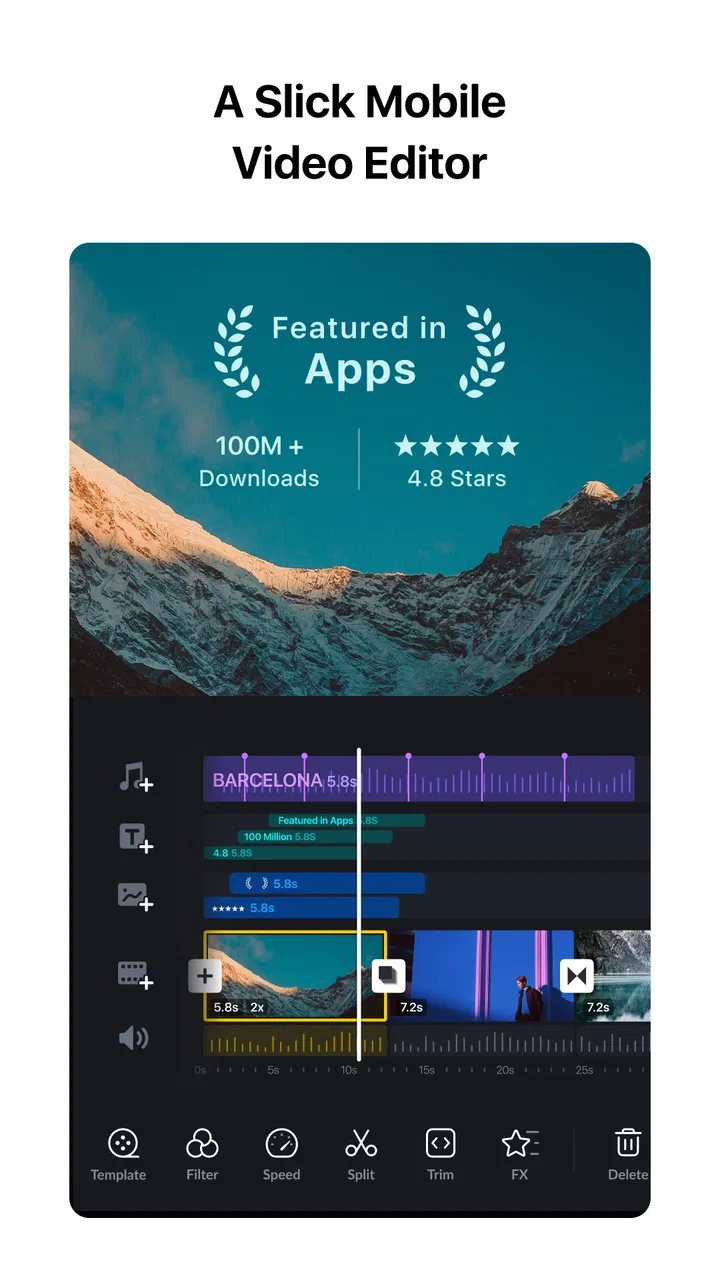
The first thing I appreciate is the balance between a simple entry point and a more serious timeline. Someone can begin with ordinary jobs such as cutting a long phone recording into a short message, while a more experienced user can work with layered visual and audio elements. That flexibility is more useful than a long list of flashy effects because it lets the same app serve different projects.
For a quick social clip, I would start by importing the source videos, removing pauses, arranging the strongest moments, and checking the result in the preview. The workflow feels suited to short-form editing, but it is not limited to one specific style. A travel montage, a family event recap, a product demonstration, or a talking-head explanation can all benefit from the same basic timeline approach.
I also like that the app does not force every project into an elaborate template. Templates can be convenient when speed matters, but they can make personal videos look interchangeable. VN gives me room to build a sequence deliberately, which is especially valuable when timing and tone matter more than decoration.
Where the free model fits
VN is free to install, and that changes how I evaluate it. I can test the editing workflow before deciding whether it belongs in my regular toolkit. Optional purchases range from under a dollar to several dozen dollars per item, so I would pay attention to any purchase prompt and check exactly what it unlocks before confirming it.
The free starting point is helpful for students, casual creators, and anyone who edits only occasionally. It also lowers the risk of trying a different workflow if a familiar editor has become too restrictive. At the same time, “free” should not be treated as a promise that every advanced element will always be available without conditions. I prefer to explore the basic tools first and decide whether the app is useful without relying on extras.
Trust begins with visible choices
For me, trust in an editor is tied to user agency. A video editor handles more personal material than many ordinary apps: faces, voices, locations, private conversations, and recordings made inside the home. I therefore look for clear moments where I can choose what to import, what to edit, and what to export rather than assuming that convenience should override control.
VN is more comfortable when I treat each project deliberately. I select only the clips needed for the current edit instead of opening my entire library without a reason. Before sharing a finished video, I review the sequence, audio, and visible background details. This is not a criticism unique to VN; it is simply the right habit for any editor that can bring personal footage into one workspace.
The app is rated for a Teen audience. That makes it a reasonable tool for older teenagers and adults who understand the difference between editing a private clip and publishing it publicly, but younger users may still need guidance around consent, recognizable people, and accidental disclosure of personal information.
Controls I would check before importing sensitive footage
My cautious workflow starts outside the timeline. I first decide whether the project needs a particular clip at all. If a recording contains an address, a school uniform, a license plate, a private notification, or another identifying detail, I either leave it out or plan to crop and cover it before the final export.
I also keep the original footage separate from the working version. That gives me a clean source if I make a poor cut, and it makes it easier to remove the project later without losing irreplaceable memories. When an edit is finished, I check the exported file in the device gallery before sending it anywhere. The gallery review catches mistakes that can be missed while concentrating on the timeline.
This approach is particularly important for family videos. Imagine recording a child’s birthday, then making a short recap for relatives. I would remove background conversations that were not meant for sharing, check every frame for other children, and send the finished file only through a channel chosen for that audience. An editor can help shape the video, but it cannot decide who should receive it.
Useful editing habits that save time
One of the most practical habits is to build the rough cut before adding style. I place the clips in order, remove dead time, and listen to the complete sequence once. Only after the pacing feels right do I add text, music, or visual changes. This prevents the common problem of polishing a moment that later gets deleted.
For spoken videos, I would make a separate pass devoted only to audio. A visually attractive sequence can still feel amateurish if speech begins too late, music competes with the voice, or a cut leaves an abrupt sound. Listening with the screen less prominent helps reveal these problems. It is a small discipline, but it produces a bigger improvement than adding another transition.
Another useful trade-off is restraint. A transition should explain a change in time, place, or subject; it should not appear simply because it is available. VN’s broad editing scope makes experimentation easy, but a consistent cut style usually keeps a personal video clearer. I would rather use a few deliberate choices than make every clip announce itself.
Good uses beyond social posts
The obvious use is a short vertical video, but I find the app more interesting for projects that need a little structure. A new business owner could assemble a simple demonstration from several phone recordings. A teacher could prepare a concise explanation with supporting visuals. A traveler could turn scattered clips into a chronological memory rather than a stream of unrelated moments.
It can also work as a preparation tool. I might edit a rough version on my phone, identify missing shots, and use that plan before recording again. This is where a mobile editor becomes more than a finishing application: it helps me think about the order of information while the project is still flexible.
There is a limit, however. If I were producing a long documentary with extensive media management, demanding color work, detailed sound mixing, or a large collaborative workflow, I would prefer a desktop editor designed for that environment. VN is convenient precisely because it keeps the process approachable; that convenience is not the same as replacing every professional workstation.
How it compares with familiar alternatives
Compared with a basic phone gallery editor, VN offers a more deliberate timeline and more room for layered projects. A gallery tool is often the better choice when I only need to trim the beginning and end of a clip or rotate a recording. Opening a full editor for that job can add unnecessary steps.
Compared with template-first social editors, VN feels more suitable when I want the result to follow my own pacing. Template tools can be faster for trend-based posts, especially when a creator wants a preset rhythm and look. I would choose VN when the footage itself is the main attraction and I want to decide how the story develops.
Compared with desktop software, the advantage is immediate access. I can begin with clips already on my phone and finish a modest project without moving files between devices. The compromise is that a smaller screen makes detailed adjustments slower, and long sessions can become tiring. For a serious multi-hour project, the desktop still wins for organization and precision.
What may cause friction
The broad feature set can make the first session feel busier than a simple cutter. New users may be tempted to explore every option before understanding the basic sequence of import, arrange, refine, and export. I recommend learning one complete workflow first instead of opening every panel at once.
Mobile editing also has practical limits. Fine timing is harder with a fingertip than with a mouse, and a crowded project can become difficult to inspect on a phone display. If a video includes many layers, repeated revisions, or precise dialogue edits, I would expect the process to take patience.
Optional purchases are another point to consider. The app remains free to start, but the presence of in-app items means I would not assume that every attractive addition belongs to the base experience. I would read each purchase screen carefully, especially if someone else uses the device or if a younger family member is editing independently.
Privacy-minded editing in daily use
My most sensitive moment with any video editor is the import step. A clip can look harmless in the timeline while revealing much more in the background. I check reflections, screens, documents, street signs, and spoken comments before treating a project as ready to share. This habit matters more than the visual polish of the final cut.
I also avoid placing confidential material in on-screen text unless the audience genuinely needs it. A phone number, booking reference, or private name can be added accidentally during a rushed edit. Before export, I watch the entire video once with the specific question, “Would I be comfortable if this frame reached the wrong person?” That final review is simple and surprisingly effective.
Account and sharing decisions deserve the same care. I keep the audience in mind at the moment I export rather than after the file has already been sent. If the video is only for one person, I use a direct method instead of posting it broadly. If it is intended for public viewing, I remove details that identify people who did not agree to appear.
Who should use it, and who should skip it
I would recommend VN to a phone-first creator who wants a serious step up from trimming, but does not want to learn a complicated desktop suite. It is also a good candidate for someone who values manual control over a ready-made visual style. The free entry point makes it easy to test, and its popularity gives it a level of familiarity that may reassure people comparing several editors.
I would be more cautious about recommending it to someone who only makes one-cut clips. A simpler built-in tool may be faster and less distracting. I would also point a professional team toward a desktop workflow if they need extensive collaboration, strict media archiving, or highly specialized finishing controls. In those situations, mobile convenience is not enough to outweigh the organizational demands.
For families, I would recommend using it with clear sharing rules. The Teen rating is a reminder that editing and publishing are connected but different activities. A teenager may be perfectly capable of cutting a video while still needing help deciding whether every person shown has agreed to distribution.
My cautious verdict
After weighing the editing experience against the trust questions that come with personal footage, I see VN as a strong free starting point for mobile video work. It offers more creative room than a basic gallery editor and a less rigid process than a template-led tool. The developer is Ubiquiti Labs, LLC, and the current version is 2.11.0, with support beginning at Android 7.0, so compatibility is worth checking before installing on an older device.
Its main strength is not simply the number of tools. It is the ability to move from a quick cut to a more considered sequence without immediately needing a desktop. Its main weakness is the same thing: more control brings more decisions, more opportunities for clutter, and more responsibility to inspect what the finished video reveals.
I would install it for travel recaps, family edits, short explanations, and personal projects where I want to shape the story myself. I would keep a simpler editor for emergency trims and a desktop application for demanding long-form work. Most importantly, I would use selective importing, careful export review, and deliberate sharing choices. The best reason to choose VN is the control it gives the editor; the best reason to stay cautious is that the editor remains responsible for every private detail inside the frame.
FAQs for VN: Photo & Video Editor
01What features does VN - AI Video Editor offer?
VN - AI Video Editor offers a comprehensive suite of features including AI-powered editing tools, a variety of filters, transitions, and effects, as well as multi-layer timeline editing. Users can also take advantage of its advanced color grading options and audio editing features, making it suitable for both beginners and professionals.
02Is VN - AI Video Editor free to use?
VN - AI Video Editor offers a free version with basic features accessible to all users. However, for advanced features and tools, a subscription may be required. This allows users to unlock premium content, additional effects, and ad-free editing experience, enhancing their creative capabilities.
03What are the system requirements for VN - AI Video Editor?
To run VN - AI Video Editor smoothly, iOS users should have iOS 12.0 or later, while Android users need Android 6.0 or above. Adequate storage space is also recommended, especially if you plan to work with high-resolution videos, to ensure optimal performance and avoid lagging.
04Can VN - AI Video Editor export videos in high resolution?
Yes, VN - AI Video Editor supports exporting videos in various resolutions, including HD and 4K. This ensures that your creations maintain high quality, whether they're being shared on social media or used in professional settings. Users can choose the resolution that best suits their needs.
05How user-friendly is VN - AI Video Editor for beginners?
VN - AI Video Editor is designed with a user-friendly interface that makes it accessible for beginners. The intuitive design and guided tutorials help new users navigate its features easily. Additionally, the AI-driven tools simplify complex editing processes, making it an excellent choice for those new to video editing.
Pros
- User-friendly interface with intuitive controls.
- High-quality video output with minimal effort.
- Wide array of AI-driven editing features.
- Regular updates with new features and tools.
- Supports multiple video formats seamlessly.
Cons
- Limited free version with watermarked exports.
- Occasional lag on older devices.
- Requires internet for some features.
- In-app purchases can be pricey.
- Some advanced tools have a learning curve.

VN: Photo & Video Editor
Gallery